
Read the Same Report After Your Airflow Worker Exits
An Airflow task writes a report and the worker can exit. Upload the closed file, pass only an id, and a fresh process checks the same bytes.
An Airflow task writes a report on the worker. The task ends, and that disk can go away with the worker. The next run does not have the file.
Airflow passes a small value from one task to the next through XCom. Putting the whole report in XCom makes every later task carry the file. The next task only needs a way to find it.
The producer closes the report, uploads it, and returns a 16-character id. mountable.io is a persistent filesystem for AI agents. The filesystem id stays in the environment, so the task returns only the report id.
from mountable_sdk import Mountable

def publish(report_id: str, report_bytes: bytes) -> str:
    fs = Mountable().filesystem(filesystem_id, "rw")
    fs.write(f"reports/alice/{report_id}.txt", report_bytes, if_none_match=True)
return report_idif_none_match=True creates the file only when that path is free. The example uses a tiny synthetic report, with two rows and no customer data.
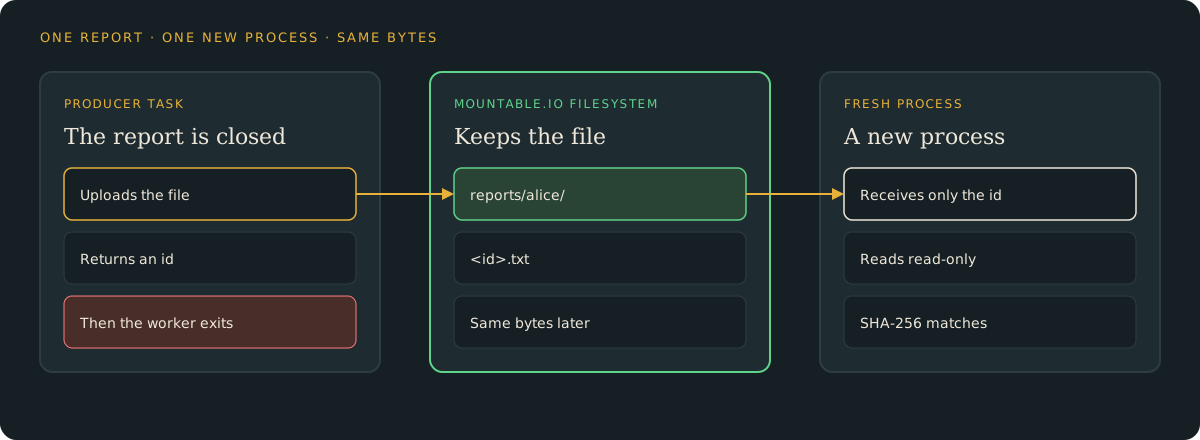
A reader and a fresh process check the hash
The reader task receives the id and checks the file. Then start a new process that is not an Airflow run. It opens a read-only handle and checks the same bytes.
uv run python report.py read --report-id "$ID"The command prints match, the path, the hash and the size. The reader task and this process see the same size and the same SHA-256.
A second create leaves the first file
Write the same id again. The new upload stops, and the first bytes stay where they are. A later read still prints the original hash.
A failed upload fails the task
If the upload fails, the task fails. The command exits without a report_id= line. There is no id to pass on.
Delete the file when you are done
uv run python report.py cleanup --report-id "$ID"This deletes that one file. A file that is already gone is left gone.
Storage is $0.20 per GiB-month at the normal usage prices. A short report like this one is under a kilobyte. Delete it when you no longer need it.
The local Airflow database stays on the machine that runs the test. For one filesystem and a hard monthly spend cap per end user, follow the capped workspace guide. This recipe uses one existing filesystem.
Try it
- The Airflow guide: set up the example, write a report, read it from a new process, and clean up.
- The example code: the tasks, the offline tests, and the fresh-process check.
- Python and TypeScript SDKs: read and write files from your backend.
mountable.io maintains this example. It is separate from Apache Airflow.