
Delete One Finished Agent Job and Leave the Other Job's Files
Job A is finished. A recursive delete of the shared run directory would also remove job B. Cleanup deletes an A file only when the path and ETag still match.
You run two agent jobs under one run directory, each with its own prefix. Job A has finished. A recursive delete of that shared directory also removes job B's files.
Those files were job B's result, so the team has to run job B again.
mountable.io is a persistent filesystem for AI agents. Job A writes a manifest of the paths it created and the ETag of each file. Cleanup deletes a file only when that path is under A's prefix and the ETag still matches, so job B's files stay.
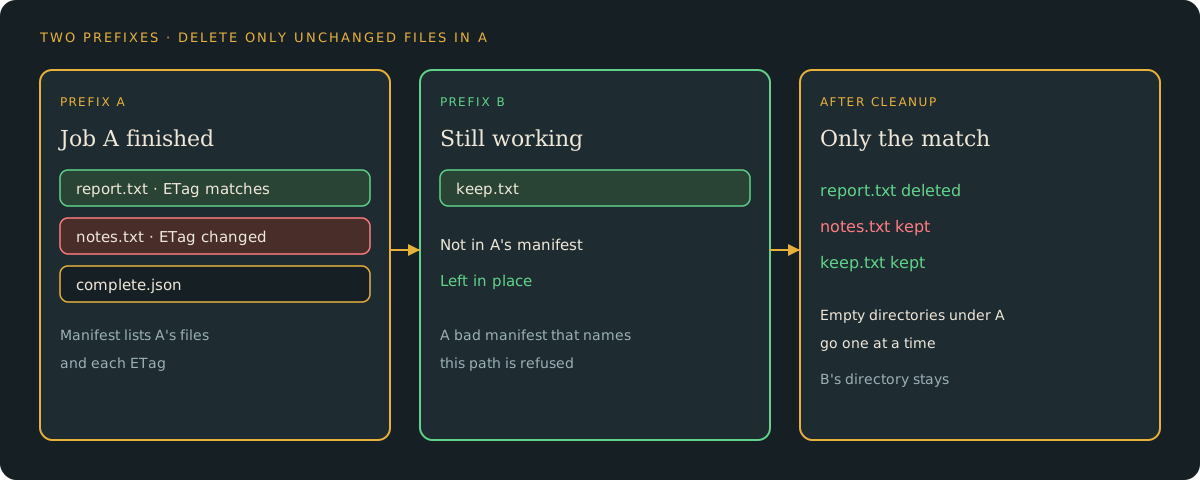
The files this cookbook writes
The companion example writes two small files under A's prefix and one file under B's. The manifest lists only A's files and their ETags.
Job A writes jobs/$RUN/a/out/report.txt with the text job-a report and jobs/$RUN/a/out/notes.txt with the text job-a notes. Job B writes jobs/$RUN/b/keep.txt with the text job-b keep. The manifest is jobs/$RUN/a/complete.json.
On those files, cleanup removes an A file whose ETag still matches. It skips anything outside A's prefix. It then removes only empty directories under A's prefix, one directory at a time.
uv run python cleanup.py cleanup-a \
  --filesystem "$MOUNTABLE_FILESYSTEM_ID" \
--run "$RUN"Job B's file stays even if a bad manifest names it. A changed file in A stays. The command prints what it deleted and what it kept.
It also says whether it stopped partway.
What the delete does to the bill
A delete removes the name. On the billing page, storage and file-count charges for that content stop after the deletion day. Retained bytes can still show in usage until reclamation.
These files are a few hundred bytes. Storage is $0.20 per GiB-month.
The session is separate
Revoking the session stops that session. The files stay where they are.
Run both jobs, then remove the test files
The live command runs both jobs. It checks that job B is still there, then removes the test files.
uv run python cleanup.py live \
  --filesystem "$MOUNTABLE_FILESYSTEM_ID" \
--run "$RUN"Follow the cookbook or run the companion.