
Give Every End User a Hard Spend Cap. Get a Webhook When Their Files Change.
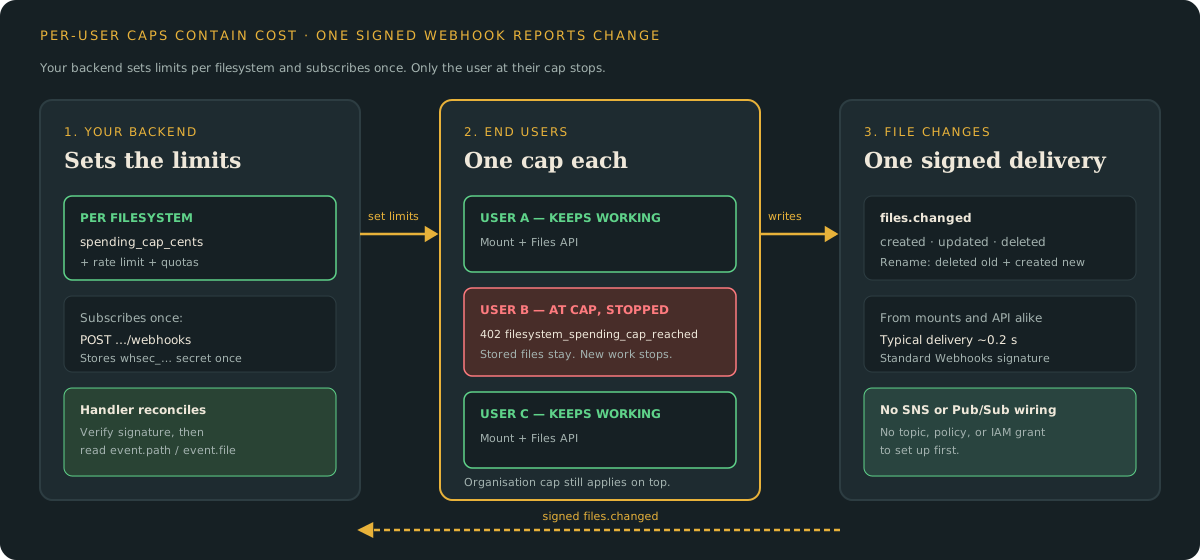
Set a hard monthly cap, a rate limit, and quotas on each end user's filesystem. Only that user stops at the cap, and one signed webhook tells your backend when their files change.
You give every customer in your app an agent with its own workspace. The agent writes files for that customer.
One agent can keep writing files in a loop for hours. Your storage and download bill grows the whole time.
Cloud budget alerts do not stop it in time. Your backend also still needs to know when an agent finishes writing a file.
Polling for finished files wastes calls. It also delays the next step in your product.
Mountable is a persistent filesystem for your AI agents. Your backend gives each end user their own filesystem.
Your backend sets the limits on that filesystem. It also subscribes to file changes on that filesystem.
Set the cap on that user only
Set a hard monthly spend cap for each filesystem. Add a limit on file changes per minute.
Add a storage quota and a file-count quota too. Mountable counts usage per filesystem, so each user has their own limit.
When that user reaches their cap, billable work stops. The Files API returns
402 filesystem_spending_cap_reached.
On the Files API, rate limits return 429 rate_limited. The other end users
keep working.
Your organisation has its own monthly cap on top. Whichever cap is reached first stops the work.
Stored files stay in place when a limit is reached. Work past the limit is refused.
Why account budgets do not fix this
AWS budget data refreshes up to three times a day. A looping agent can spend for hours before the report moves.
GCP spend caps do not cover Cloud Storage. An account-level cap cannot stop one user's storage bill.
A per-user cap has to sit where per-user charges are counted. That is the filesystem itself.
Set the limits when you create the filesystem
Set the limits at create time. Then there is never a moment without them.
curl -X POST https://mountable.io/api/v1/orgs/$ORG_ID/filesystems \
  -H "Authorization: Bearer $MOUNTABLE_API_KEY" \
  -H "Content-Type: application/json" \
  -d '{"name": "user-42", "spending_cap_cents": 500,
       "mutations_per_minute": 120, "byte_quota": 5368709120,
"entry_quota": 50000}'This user can spend at most $5.00 or €5.00 a month, in your billing currency. They can make 120 changes a minute and store 5 GiB in 50,000 entries.
Change the limits later with PATCH. The full fields and errors are in
Limits per end user.
Get told when files change
One API call registers a webhook for a filesystem. Mountable then sends a
signed files.changed message when files change.
Each event is created, updated, or deleted. A rename sends deleted for
the old path and created for the new path.
Mounts and the Files API both trigger the same events. Typical delivery is about 0.2 seconds.
Each event carries the file as it is now. A deleted event has file: null,
because the path is gone.
Your handler reconciles each path to that state. It does not replay a history.
On S3 you chain an SNS topic, a topic policy, and a confirmed subscription. You also verify SNS signatures yourself.
On GCS you set up Pub/Sub and grant its service agent access. Then you add a push subscription.
With Mountable you store one secret and verify one signature. The secret is shown once when you create the webhook.
Subscribe once, then react
curl -s https://mountable.io/api/v1/orgs/$ORG_ID/filesystems/$FS_ID/webhooks \
  -H "Authorization: Bearer $MOUNTABLE_API_KEY" \
  -H "Content-Type: application/json" \
-d '{"url": "https://example.com/hooks/mountable", "path_prefix": "/"}'Your endpoint verifies the Standard Webhooks signature. Then it reconciles each changed path.
def handle(message: dict) -> None:
    data = message["data"]
    cursor = int(data["cursor"])
    if cursor <= state.last_cursor:
        return
    if message["type"] == "files.resync":
        state.relist()
    else:
        for event in data["events"]:
            state.reconcile(event["path"], event["file"])
state.last_cursor = cursorVerify against the raw body before you parse it. Reject old timestamps.
The verification code, retries, and resync steps are in Webhooks.
Try it
- Limits per end user: set a cap, a rate limit, and quotas from your backend.
- Webhooks: subscribe once and verify the signature.
- Interactive Showcase: watch agents share one folder in your browser.