
Give Your Agent Sandbox a Folder, Not Your Storage Keys
How to give disposable Linux sandboxes a persistent directory—without copying tarballs on every run or putting storage keys inside an untrusted container.
AI agents run untrusted code. That is why we lock them inside disposable Linux sandboxes.
When the task finishes, the sandbox is destroyed. If the agent breaks something, nothing outside the container is touched.
There is just one problem. The next agent run usually needs the files from the last one.
Maybe Agent A cloned a repository and wrote a fix, and Agent B needs to review it. Maybe a user comes back ten minutes later and asks the agent to continue.
At that point, teams usually pick between two bad options:
- Copy tarballs back and forth. Every cold start downloads and unpacks the workspace. Every teardown zips it back up and uploads it. If the sandbox crashes halfway through, the work is gone.
- Put storage credentials inside the sandbox. You mount an object bucket inside the container and hand an untrusted process the keys to your storage.
Neither feels right. You built a sandbox to isolate untrusted code, and now you are either hauling zip files around or slipping your keys under the door.
A valet key for a folder
Think about how a valet key works. When you hand your car to a parking attendant, you don't hand over your house keys. You give them a key that starts that one car, can't open the trunk, and stops working as soon as you take it back.
Mountable does the same thing for a Linux directory:
- Your backend keeps the API key. It never enters the sandbox.
- The sandbox gets a one-time ticket. The ticket works once, expires in five
minutes if unused, and mounts one filesystem in either read-write (
rw) or read-only (ro) mode.
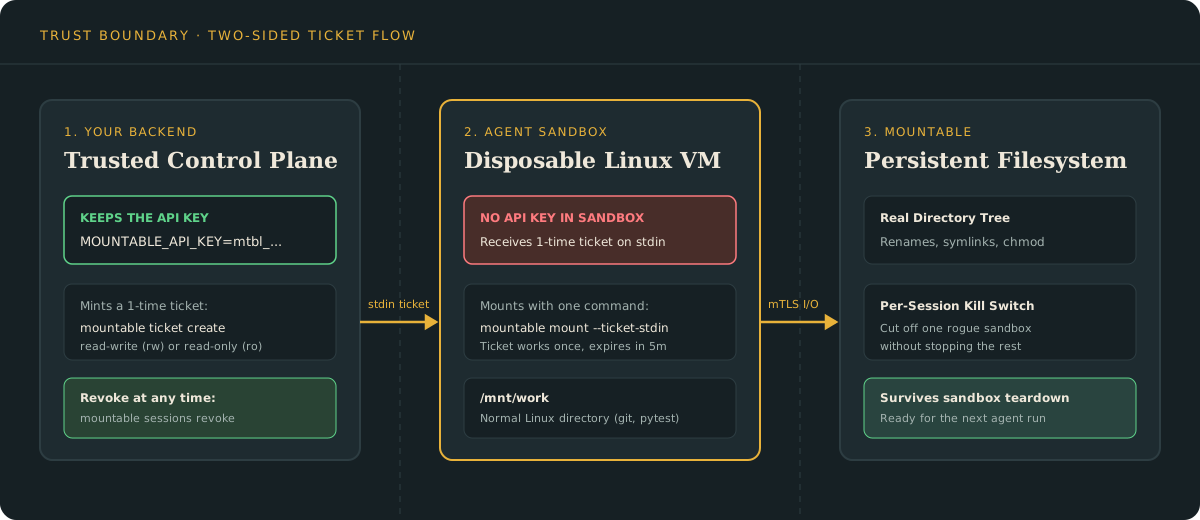
How it looks in practice
Suppose you have two sandboxes working on the same project:
- The Coder writes code and runs tests. It needs read-write access.
- The Reviewer inspects the changes. It should only have read-only access.
First, your backend creates a filesystem and mints a ticket for the Coder:
FS_ID=$(mountable fs create agent-workspace)
mountable ticket create "$FS_ID"Next, you pass that one-time ticket into the Coder sandbox over stdin:
mkdir -p /mnt/work
printf '%s\n' "$MOUNTABLE_TICKET" | mountable mount --ticket-stdin /mnt/work &That's it. /mnt/work is now a normal Linux directory.
The agent can run git, pytest, npm, or rg. It can rename directories,
create symlinks, and change file permissions (chmod)—things that break on many
object-storage adapters.
When the Coder is done, it unmounts:
mountable unmount /mnt/workNow you spin up the Reviewer on a fresh machine. Your backend mints a read-only
ticket with --ro:
mountable ticket create "$FS_ID" --roThe Reviewer mounts the exact same directory. It sees every file the Coder wrote, and any attempt to modify a file is rejected by the filesystem.
Pull the plug on one agent at any time
What if an agent gets stuck in a bad loop while a job is still running?
You don't have to rotate keys or shut down every other container using that filesystem. From your backend, you revoke that single session:
mountable sessions revoke "$SESSION_ID"Within seconds, that sandbox is cut off and unmounted. Every other sandbox on the filesystem keeps working.
Try it
- Interactive Showcase: watch the multi-sandbox hand-off and the session kill switch in your browser.
- Quickstart: install the CLI and mount your first filesystem on Linux.
- Mount from a sandbox: copy-paste commands for connecting your backend and sandbox.