
One Filesystem for the Planner, the Coder, and the Verifier
mountable.io is one filesystem for a full coding run. The planner writes the plan, the coder fixes the code, and a signed webhook starts a verifier that only reads.
Your planner agent finishes its plan inside a sandbox. Then the sandbox stops.
Your coder starts in a fresh sandbox. It cannot see the plan. You pack the folder up, copy it over, and unpack it by hand before any real work starts.
mountable.io is a persistent filesystem for your AI agents. One coding run gets one filesystem. Every stage works on that filesystem, and nothing has to be packed up between stages.
Three stages, one filesystem
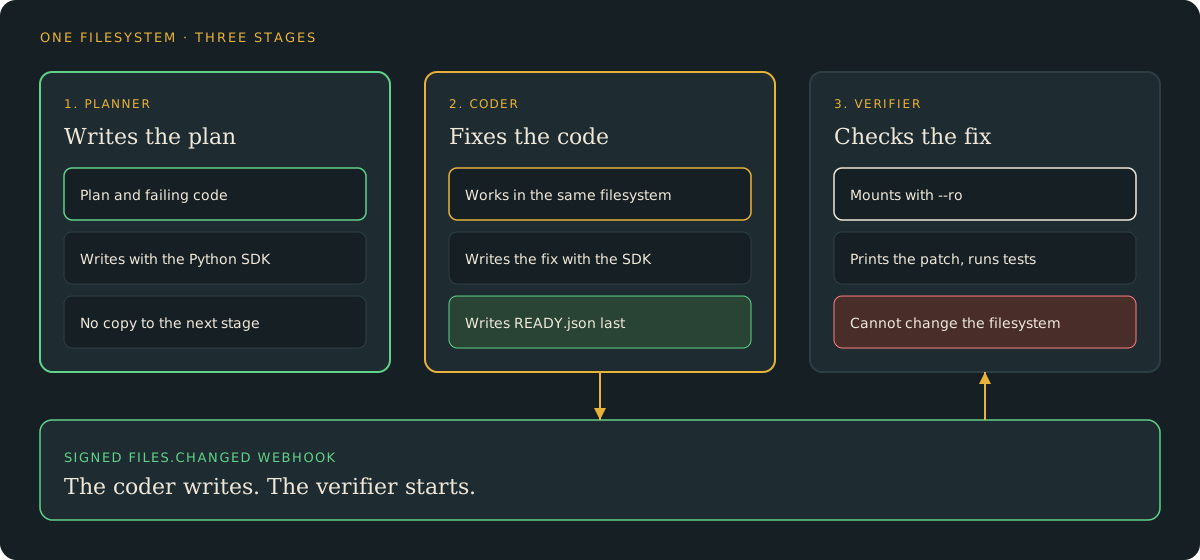
A planner writes the plan. A coder fixes the code. A verifier checks the fix.
All three stages use the same mountable.io filesystem for that run. The planner and coder write to it. The verifier only reads it.
The planner writes the plan
The planner writes its plan, a broken adder, and a test that fails on that adder into the shared filesystem. It uses the Python SDK, so the files land on the same paths the coder will open.
There is no export step. The coder opens the filesystem and the plan is already there.
The coder fixes the code in place
The coder reads the plan from that same filesystem. It writes its fix back with the Python SDK. No export or copy sits in between.
When the fix is ready, the coder writes one small marker file last. That marker says the filesystem is ready to check.
Your code starts the verifier on a signed webhook
One API call subscribes you to signed files.changed webhooks. They fire on every create, write, rename and delete. Mounts and the Files API both send them.
The coder's writes fire the webhook. Your code checks the signature, sees the marker, and starts the verifier. Typical delivery takes about 0.2 seconds.
You do not poll the filesystem. You do not copy it anywhere.
The verifier only reads
The verifier mounts the same folder with --ro. It prints the patch and runs the tests. Writes fail, so it cannot change the filesystem it is checking.
The verifier mounts with a one-time ticket. Your reusable API key stays out of the mount.
Run it offline first
The example lives in the mountable repository. Its default run uses memory, checks a locally signed webhook, and runs the real tests in a temporary folder.
From the repository root:
python3 examples/research-showcases/multi-agent-harness/harness.py
python3 examples/research-showcases/multi-agent-harness/test_harness.pyThe first command prints the fix. It creates no account and no charge. The second command runs the test suite.
To run the same flow against mountable.io, follow the live steps in the showcase README. The live run creates one folder for the run. The planner and coder write to it with the Python SDK, and the verifier mounts that folder read-only.
One run stops at its own cap
Each run gets its own filesystem. Your backend sets a hard monthly spend cap and a rate limit for that filesystem when it creates it.
If that run's usage hits the cap, its billable work stops. The API returns 402 filesystem_spending_cap_reached. Rate limits return 429 rate_limited.
Other runs keep working, because each run has its own limits.
Connect your own agents
Keep the shape and swap in your agents. Replace the two small stage functions with your planner and coder calls.
Write the marker file last. Give the verifier a read-only ticket. Give each run its own filesystem, so one run never races another run's verifier.
One run, one filesystem. The planner writes, and the coder fixes.
The verifier checks. Nothing gets packed up or copied between stages.
Try it
- The showcase code: run the planner, coder, and verifier offline.
- Python and TypeScript SDKs: write the first file with
mountable-sdk. - Limits per end user: set a hard spend cap and a rate limit per filesystem.
- Signed file-change webhooks: react when your agents create, write, rename or delete files.
- Mount from a sandbox: pass the one-time ticket on stdin and mount the folder.