
Keep Code in Git, Hand the Agent's Report to the Next Worker
A source fix belongs in Git history. A generated report can live on mountable.io so a fresh worker can read it after the first worker exits.
Your coding agent fixes a bug in a temporary worker, commits the fix and writes a short report for a reviewer that starts later. The worker is gone by then, so its local report is gone too. Why not commit the report alongside the fix?
Git is a good home for reports whose history belongs with the source. You get commits, diffs, branches for review and local history you can use offline. But if each run only needs a temporary report, committing every one adds generated text to the branch history and the diff you want someone to review.
mountable.io is a persistent filesystem for AI agents. Keep the source in Git and save each run's report on the shared filesystem, where the next worker opens it read-only. Your application deletes it when the review is done.
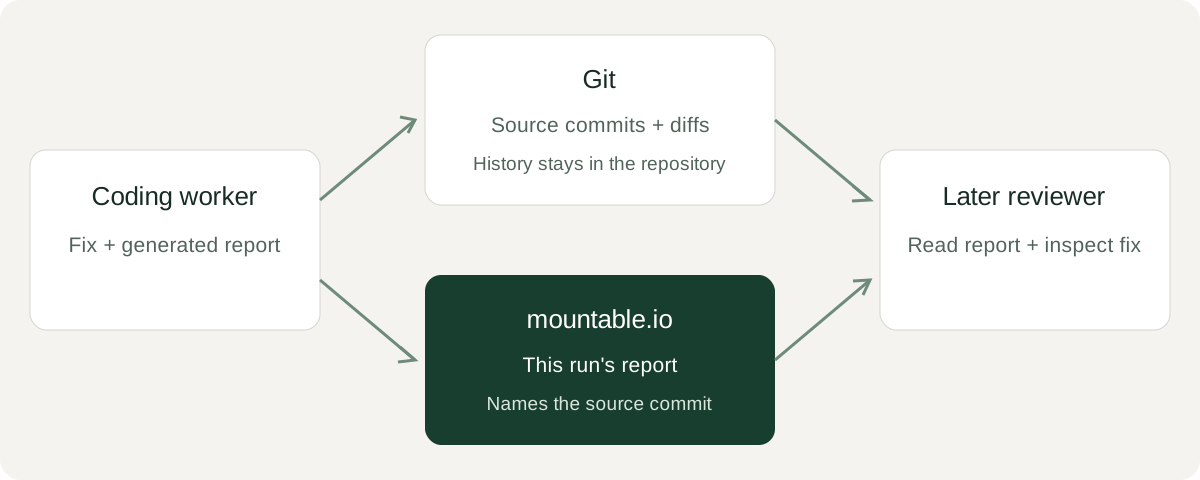
One fix, one report
The companion example makes a tiny local repository with two commits. Its fix makes total() ignore negative values. It then runs the function and writes a 110-byte report naming the source commit.
Here is the local Git transcript. The command creates its fixture on local disk and removes that temporary repository when it finishes. It prints each Git command it runs, followed by its output.
$ uv run python handoff.py git-demo --report report.json
$ git diff -- total.py
diff --git a/total.py b/total.py
index 5dcb752..65e237d 100644
--- a/total.py
+++ b/total.py
@@ -1,2 +1,2 @@
 def total(values):
-    return sum(values)
+    return sum(value for value in values if value >= 0)
$ git log --format=%s -2
Ignore negative values
Add total
report bytes=110 sha256=c0aa0abed0106223964b0cf7f6af6e25e3c9412ef0b2653366481d7ac3ee98b4
{"check": "total([3, -2, 4]) == 7", "result": 7, "source_commit": "c779fafd5d0d6876b9509f5ae21458849530888e"}The report stays in report.json. In your application, keep your real source repository and record the commit your job tested.
Let the next worker read it
Use the example with an existing mountable.io account and filesystem. Set your API key in your private environment. The cookbook has the setup commands and explains how to choose a new run ID.
The second transcript shows the file handoff. FS_ID selects your filesystem, RUN selects this run's filename, and SHA is the checksum printed above.
We ran these commands against production as separate processes. The output shows our run's filename.
$ uv run python handoff.py upload --filesystem "$FS_ID" --run "$RUN" --report report.json
stored git-output-e6e01531-2646a2dd.json bytes=110 sha256=c0aa0abed0106223964b0cf7f6af6e25e3c9412ef0b2653366481d7ac3ee98b4
$ uv run python handoff.py read --filesystem "$FS_ID" --run "$RUN" --sha256 "$SHA"
match git-output-e6e01531-2646a2dd.json bytes=110 sha256=c0aa0abed0106223964b0cf7f6af6e25e3c9412ef0b2653366481d7ac3ee98b4
{"check": "total([3, -2, 4]) == 7", "result": 7, "source_commit": "c779fafd5d0d6876b9509f5ae21458849530888e"}The upload fails if that run's file already exists. A rerun cannot quietly replace the earlier report. The reader starts after the writer has exited and opens a read-only session to print the saved file.
Use the history and the handoff together
Use Git when you want history, diffs and branch review. Git also works offline and across distributed clones. Commit the generated report too when you want to keep it with that history.
Use the shared filesystem when the next worker needs this run's output with its own readers and deletion schedule. The reviewer can read the report, then inspect the source commit it names in the project's Git repository. Each tool keeps doing the job you chose it for.
Delete old runs
uv run python handoff.py cleanup --filesystem "$FS_ID" --run "$RUN" --sha256 "$SHA"Cleanup checks the file before deleting it, so a changed file is left alone. At the published USD prices, storage is $0.20/GiB-month and downloads are $0.02/GiB. Have your application delete old reports on a schedule, and set a spending cap for the filesystem.
Run the companion or follow the cookbook. mountable.io maintains this example using its Python SDK.