
Keep Your LlamaIndex Index for the Next Worker
Save the files LlamaIndex writes on mountable.io, then download and load the index in a fresh worker instead of rebuilding it.
Your RAG job runs in a temporary worker. LlamaIndex builds an index and saves
it to ./storage. Then the worker shuts down and its disk is discarded.
The next worker needs that index. Rebuilding means parsing and embedding the documents again. If you use a hosted embedding model, those repeated calls cost money too.
mountable.io is a persistent filesystem for AI agents. Once LlamaIndex finishes writing the index, upload its files there. A new worker downloads them and loads the saved index. LlamaIndex already saves its index as files, so you can keep them without running a vector database service for this job.
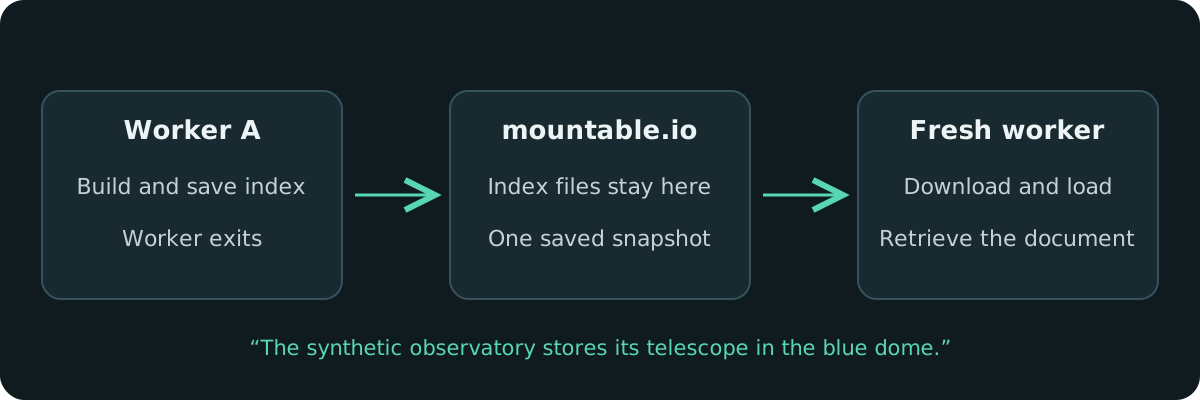
Keep the files LlamaIndex already writes
The core flow uses LlamaIndex's normal persist and load calls, with the mountable.io Python SDK carrying the files between workers:
# First worker, after building the index:
index.storage_context.persist(persist_dir="./storage")
for path in Path("./storage").glob("*.json"):
    fs.write(f"llamaindex/run1/{path.name}", path.read_bytes(), if_none_match=True)

# Later worker, in a new empty local directory:
for name in saved_names:
    Path("./restored", name).write_bytes(fs.read(f"llamaindex/run1/{name}").data)
context = StorageContext.from_defaults(persist_dir="./restored")
index = load_index_from_storage(context, embed_model=embedding_model)That is a sketch of the transfer. The complete example also checks that every required file arrived before loading it.
Run it in two processes
The example indexes two short synthetic documents using fixed local embeddings. It asks which document mentions a telescope and runs without a model API key. With your mountable.io filesystem and key set up as in the guide, run:
uv run python snapshot.py publish --filesystem "$FS_ID" --run "$RUN"
# Save the printed manifest_sha256 as MANIFEST_SHA256.
uv run python snapshot.py query --filesystem "$FS_ID" --run "$RUN" \
--manifest-sha256 "$MANIFEST_SHA256"The second command is a new process. It downloads the saved files into an empty temporary directory, loads the index, and prints:
The synthetic observatory stores its telescope in the blue dome.We ran these commands against production storage. The fresh process retrieved that document from the saved index. Its read-only access lets it query the snapshot while leaving the stored files unchanged.
Each snapshot keeps its own files
Every publish uses a new path. A retried job cannot overwrite an earlier snapshot. The publisher records a fingerprint of the file set, which you pass to the reader. If a file is missing or changed, the reader refuses to load it. Use the same embedding model when building and loading the index.
This suits an index that one job builds and later jobs read. A vector database suits an index that many writers update continuously.
The LlamaIndex guide covers setup, the complete file checks, usage billing and cleanup. mountable.io maintains this community recipe separately from LlamaIndex.