
Keep pytest Reports After the Worker Is Gone
A test worker exits and its JUnit report goes with it. Upload it to mountable.io before the worker exits and read the same bytes later.
Say you run your tests in a short-lived worker. It might be a CI job, a sandbox, or a queue worker that runs pytest and then exits. Each run gets a fresh machine, and the machine is thrown away when the run ends.
Then a test fails. pytest wrote a JUnit report on that machine.
The report holds the test names and the failure messages. It is exactly what you need, and it was saved to a disk that is already gone.
The usual fixes take work. A CI artifact step only exists when the worker is a CI job, and a sandbox or a queue worker has none. A storage bucket means a bucket, credentials, an upload script and a way to find the right object later.
This recipe keeps the report. mountable.io is a persistent filesystem for AI agents. The worker uploads its JUnit XML and a short failure note before it exits. The files stay, and a fresh process reads them later.
The failing test still fails your job. The example returns pytest's own exit code, even when the upload itself fails.
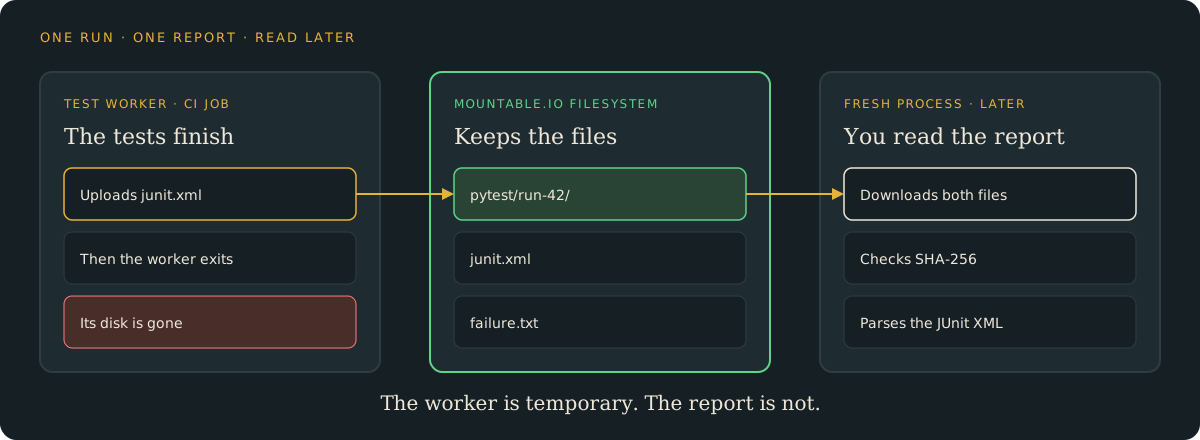
Upload the report before the worker exits
Wait for pytest to finish, so the JUnit file is closed. Then upload it with the mountable.io Python SDK:
from mountable_sdk import Mountable

fs = Mountable().filesystem(filesystem_id, "rw")
fs.write(f"pytest/{run_id}/junit.xml", junit_bytes, if_none_match=True)
fs.write(f"pytest/{run_id}/failure.txt", note_bytes, if_none_match=True)Your code picks a new run_id for every run, so each run gets its own folder. if_none_match=True means the write only succeeds if the file does not exist yet.
A retried job cannot replace an earlier run's report by mistake. The example runs a tiny synthetic suite, with one test that passes and one that fails on purpose.
Read it later, from anywhere
You do not need the worker's disk to read the report. Read both files with the CLI, from any machine:
mountable files read "$FS_ID" pytest/run-42/junit.xml > junit.xml
mountable files read "$FS_ID" pytest/run-42/failure.txtYou get the report pytest wrote. Nothing is rebuilt from a log.
When the worker's own copies are still on your machine, reports.py check goes further. It downloads both files again and compares every byte:
uv run python reports.py check \
  --filesystem "$FS_ID" \
  --run run-42 \
--dir ./outThe command prints match for each file. It also parses the JUnit XML and prints the test and failure counts.
Who can read and who can write
Keep the API key in your CI job's secrets. That job can write the report. A reviewer who only needs to read it opens the filesystem read-only, so they cannot overwrite it.
The same files are easy to reach later. Read them with the SDK, the CLI, or a mount. Give a reviewer agent read-only access to the same folder.
Clean up when you are done
Delete the run's two files when you no longer need them:
uv run python reports.py cleanup \
  --filesystem "$FS_ID" \
--run run-42Storage costs $0.20 per GiB-month at the normal usage prices. A JUnit report and a short note are a few kilobytes. Delete old runs when you are done with them.
Try it
- The pytest guide: set up the example, run, check and clean up.
- The example code: the full upload with its checks, plus offline tests.
- Python and TypeScript SDKs: read and write files from your backend.
mountable.io maintains this example. It is not part of pytest.