
Give Your LangGraph.js Nodes a File the Next Process Can Read
A LangGraph.js node writes a brief, then the process exits and the in-memory checkpoint is gone. Store the brief on mountable.io so the next node and a new process can read the file.
Say you have built a graph with LangGraph.js. One node writes a brief. The next node needs that brief. Then the Node process exits.
If the graph uses the in-memory checkpointer, the brief leaves with the process. The next job starts from zero. A checkpoint that lives only inside that thread is not a file. Another graph, a teammate, or a different tool cannot open it.
mountable.io is a persistent filesystem for AI agents. The write node stores the brief as a file on that user's filesystem. The state keeps the path. The next node reads the file, and so does a new process that starts with an empty checkpoint.
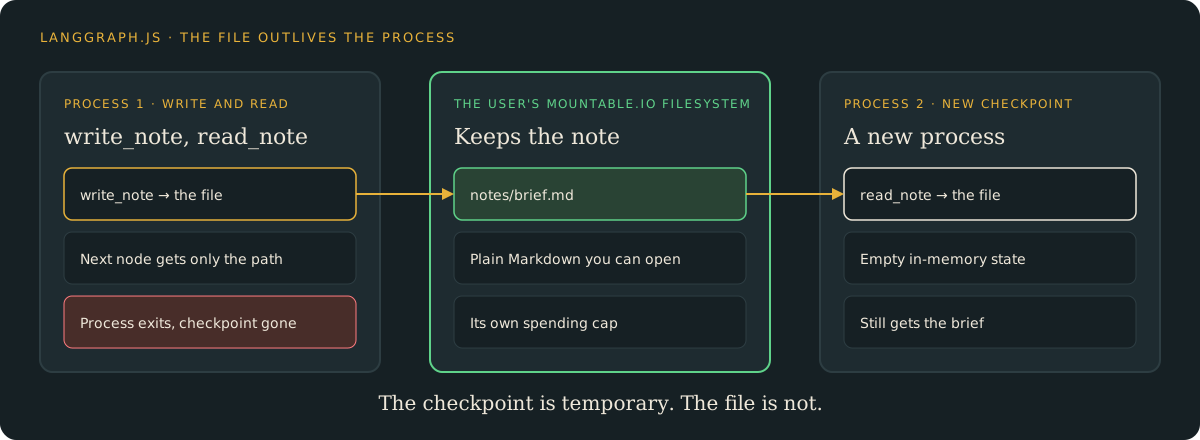
The next node reads the file
Your backend opens the user's filesystem and chooses the path. Do not take either from graph state that a model can set. write_note stores the text and returns empty text, so read_note has no brief in its input. It has to read the file.
import { Annotation, END, MemorySaver, START, StateGraph } from "@langchain/langgraph";
import type { Filesystem } from "mountable-sdk";

const NoteAnnotation = Annotation.Root({
  path: Annotation<string>(),
  text: Annotation<string>(),
});

function buildGraph(fs: Filesystem) {
  return new StateGraph(NoteAnnotation)
    .addNode("write_note", async (state) => {
      await fs.write(state.path, state.text, { ifNoneMatch: true });
      return { text: "" };
    })
    .addNode("read_note", async (state) => {
      const file = await fs.read(state.path);
      return { text: new TextDecoder().decode(file.data) };
    })
    .addEdge(START, "write_note")
    .addEdge("write_note", "read_note")
    .addEdge("read_note", END)
    .compile({ checkpointer: new MemorySaver() });
}ifNoneMatch: true means the write only succeeds when the file is not there yet. A second run does not replace the first note. The full example also checks the path, keeps the note under 16 KiB, and refuses a filesystem id that is not the one your backend bound. These nodes do not call a model.
A new process still prints the note
handoff writes the note and reads it back in one process. resume is a second process. It has a new thread, a new in-memory checkpointer, and a read-only handle on the same filesystem.
npx tsx graph.ts handoff \
  --filesystem "$FS_ID" \
  --path notes/brief.md \
  --text "Parser review complete. Check empty input next."

npx tsx graph.ts resume \
  --filesystem "$FS_ID" \
--path notes/brief.mdThe second command starts with an empty checkpoint, so it has none of the first run's state. It still prints the brief, because the brief now lives in a file.
We ran both commands against production. The next node printed the note inside the first process. Then a new Node process, with a new in-memory checkpointer, printed the same text.
When a file beats another checkpoint
A persistent checkpointer is the right tool when you need to pause and resume the same thread. A file helps when the note should be opened outside that thread.
Other graphs can open notes/brief.md without the first thread's id. The note is plain Markdown. You can open it with the mountable.io CLI, or hand the same filesystem to an agent in another framework through the SDKs. Each user can have their own filesystem and a monthly spending cap. When one user's filesystem reaches its cap, their billable mountable.io work stops. Other users keep working. The cap covers mountable.io usage, not a model provider's bill.
Try it
- The LangGraph guide: Node.js setup, both commands, and the note they print.
- The example code: the full graph, with tests you can run offline.
- Limits per end user: give each user a filesystem with its own spending cap.
mountable.io maintains this example. It is not an official LangChain package.