
Keep a Mastra Workflow's Note After the Worker Exits
A Mastra workflow saves a review note on mountable.io. A fresh worker reads the same file through a read-only handle.
Your Mastra workflow reviews a code change and writes a Markdown summary in a temporary worker. When that worker exits, its local file disappears. Tomorrow's worker repeats the review because it cannot open yesterday's summary.
You could put the note in a database table and build read and write access around it. A shared file fits when people, scripts and other agents also need to open that Markdown output.
mountable.io is a persistent filesystem for AI agents. Save the note there, and the next worker can read the same file. This example uses Mastra tools inside a deterministic workflow.
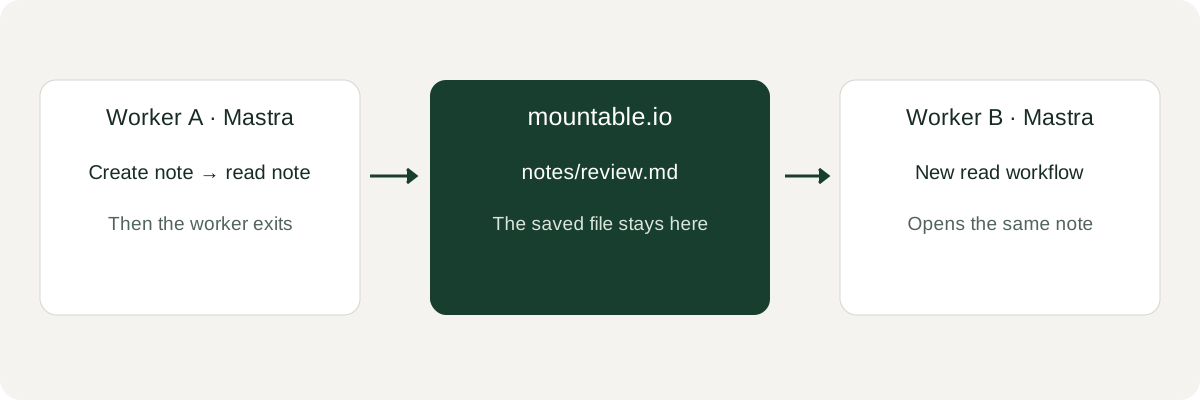
Write once, read from the next worker
The first workflow runs two tools in order. The writer saves the note and returns only an acknowledgement. The reader opens the file on mountable.io, so it gets the saved bytes rather than a copy passed from the writer. A second workflow can read that file from a new process.
Your backend opens the authenticated user's filesystem and fixes the note path before constructing the tools. The writer accepts only the note text. Here is its core:
import { createTool } from "@mastra/core/tools";
import { z } from "zod";

const createNote = createTool({
  id: "create-note",
  description: "Create the backend-selected note.",
  inputSchema: z.object({ text: z.string() }).strict(),
  execute: async ({ text }) => {
    await writer.write(path, text, { ifNoneMatch: true });
    return { stored: true };
  },
});writer and path come from your backend. ifNoneMatch: true preserves the first note if the workflow tries to create that path again. The full example checks text sizes and paths, adds the read tool and wraps both tools with Mastra's createStep(tool) API.
Run it in two processes
Use Node 24+, an existing mountable.io account and filesystem, and your API key in a private environment. mountable.io usage is billed at the published prices. The example needs no model key or hosted Mastra service.
git clone https://github.com/writeitai/mountable.git
cd mountable/examples/mastra-workspace
npm ci
export MOUNTABLE_FILESYSTEM_ID=your-filesystem-id
export MOUNTABLE_NOTE_PATH="notes/mastra-$(date +%s).md"
npm run handoff -- --text "Parser review complete."
npm run readBoth commands print Parser review complete.. We ran them against production in separate processes. The second process opened the same note through a read-only SDK handle.
Why keep it as a file
You can open the Markdown yourself through the CLI, SDKs or a mount on your machine. Another worker can use the same file without needing to know which framework wrote it. There is no table schema to set up for the note.
Your backend can give each user their own filesystem with a monthly spending cap. When one user reaches that cap, billable work on their filesystem stops while other users keep working. If your application also calls a model, that model's bill is separate.
Follow the Mastra guide for setup, expected output and cleanup. The runnable example includes offline tests, and limits per end user explains how to set each user's cap.
mountable.io maintains this community example. Mastra's own workflow snapshots remain a separate storage choice.