
Run the Same Haystack Pipeline in a Fresh Worker
Keep the YAML definition a Haystack job saved, then verify and rerun that configuration in another worker.
Your search job saves pipeline.yaml after preparing its documents. The
temporary worker exits and its disk is discarded. When you inspect the run
later, the file that recorded its component settings and connections is gone.
Git is a good home for reviewed pipeline code. Keeping the YAML saved by a particular run lets another worker inspect and rerun that exact artifact, without making a source commit for every job.
mountable.io is a persistent filesystem for AI agents. Upload the saved YAML before the first worker exits. A fresh worker downloads it, verifies the file and runs the pipeline locally.
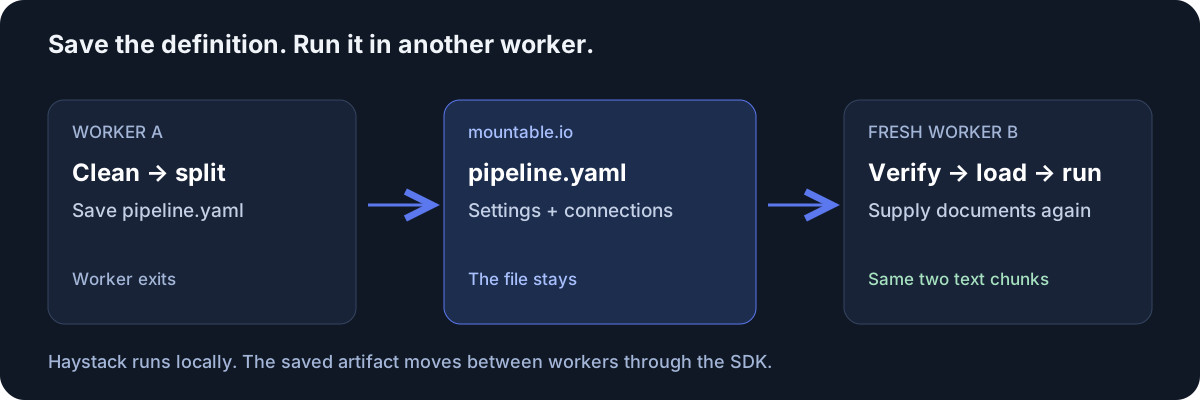
Keep the definition the run saved
Haystack already provides Pipeline.dump() and Pipeline.load(). The
Python SDK carries the file between the two processes:
# First worker:
with open("pipeline.yaml", "w") as stream:
    pipeline.dump(stream)
raw = Path("pipeline.yaml").read_bytes()
fs.write("haystack/run1.yaml", raw, if_none_match=True)
sha256 = digest(raw)  # Pass this through trusted job metadata.

# Fresh worker, with a read-only filesystem handle:
raw = fs.read("haystack/run1.yaml").data
validate(raw, sha256)
pipeline = Pipeline.load(io.StringIO(raw.decode("utf-8")))
output = run_pipeline(pipeline)That is the core flow. The complete runnable example includes the imports, pipeline, validation and cleanup.
See the same output in two processes
The recipe uses Haystack 3.4.1 and mountable-sdk 0.3.0.
DocumentCleaner removes extra whitespace and DocumentSplitter splits
two synthetic sentences into chunks of seven words. It runs entirely
locally, without a hosted model.
With your filesystem and private key set up as in the guide, run:
uv run python handoff.py publish --filesystem "$FS_ID" --run "$RUN"
# Save the printed sha256 as SHA256.
uv run python handoff.py run --filesystem "$FS_ID" --run "$RUN" --sha256 "$SHA256"The first command saves and uploads the YAML. The second starts a new process and prints the same output:
["The synthetic observatory has a blue dome.", "The telescope opens at dusk."]We ran this handoff against production storage. The fresh process loaded the saved file through read-only access and produced those same two chunks.
Pass on a file your job owns
Load only pipeline files your own trusted job wrote. Pass the fingerprint through job metadata you control and check it before loading. A matching fingerprint shows the bytes stayed the same, not who wrote them.
The saved YAML contains component settings and connections. The second worker supplies documents to those components again. For a frozen index with its document data, see LlamaIndex snapshots.
Try the two-process handoff in the Haystack cookbook. The guide covers the full trust checks, billing and cleanup. mountable.io maintains this community recipe separately from Haystack.